Engage AI - AI Powered conversational platform
An AI-powered conversational platform that helps businesses manage customer conversations, automate support and enable AI-assisted workflows.
Product Designer
Web Platform
Agentic AI
Overview
Engage AI is an AI-powered conversational platform that helps businesses automate customer interactions and support human agents with the right context. I worked across the Admin and Agent Portals, designing workflows for AI configuration, knowledge management, analytical dashboards and agent assistance.
Key Challenge
Structure complex admin modules, support agent, and AI workflows into a product experience that supports different roles with reducing complexity.
Admin Portal
The Admin Portal is the control center for businesses to configure, monitor, and manage their AI conversational platform. It brings bot configuration, customer tickets, knowledge base, analytics dashboard, response/outcomes and broadcast channels into one centralized workspace.
Dashboard & Outcomes


A structured dashboard gives major overview of key conversations, pending task, bot performance and portal outcomes. The simplified outcomes view makes it easier to assign task and monitor statuses to resolve customer tickets
Broadcast & API Console


Connect with customers across multiple channels through broadcast campaigns, while the API Console enables secure integrations and streamlined access to the Engage AI services.
Bots & Knowledgebase


The Bot Summary brings key settings like personality, language, availability and announcements into one place for easy management. The Knowledgebase lets administrators add relevant data to improve bot responses and test how the bot uses that knowledge in the Playground.
Agent Portal
The Agent Portal is the workspace for customer support teams handling conversations that require human assistance. It combines customer context, AI insights and contextual response to help agents resolve queries faster and more effectively.
Customer Queries

Brings customer conversations into one workspace, helping agents quickly understand queries, view conversation context and respond more efficiently.
Contextual Response
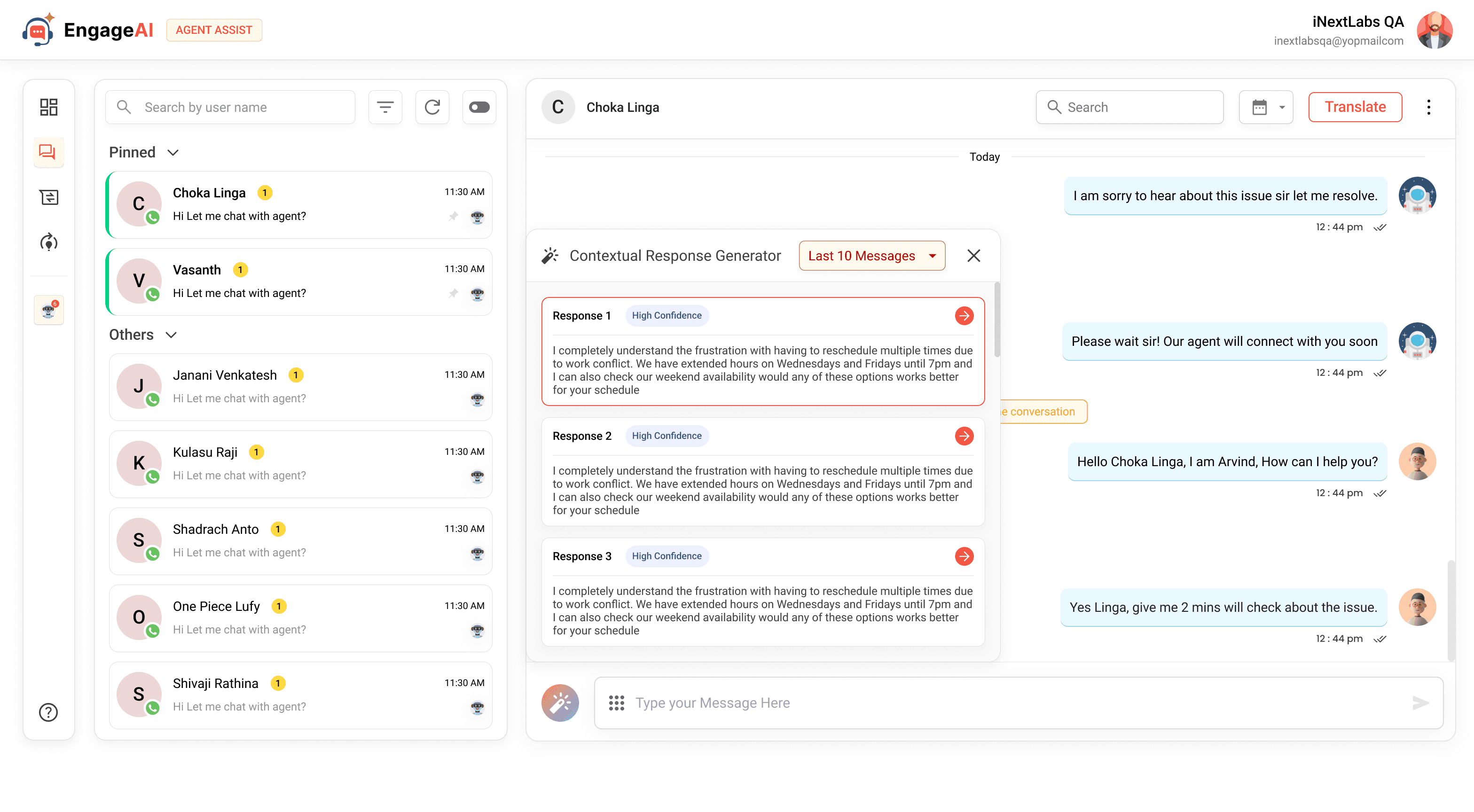
Helps agents generate relevant responses based on the ongoing customer conversation, making it easier to understand the context and respond quickly.
Sentiment Analysis

Analyzes customer conversations to show sentiment, emotions and key terms, helping agents better understand how customers are responding.
Knowledge Training

Helps support agents learn from structured training modules, track their progress and strengthen their ability to handle customer conversations effectively.
Highlights
The project brought complex AI capabilities into two connected experiences: an Admin Portal for configuration and knowledge management, and an Agent Portal for customer conversations and AI-assisted customer support. Consistent interaction patterns and reusable components created a scalable product experience while keeping workflows focused for each user role.

Designing Thoughtfully. Building Intentionally.


Engage AI - AI Powered conversational platform
An AI-powered customer support platform combining conversational AI, agent assistance and admin portal to manage customer tickets.
Product Designer
Web Platform
Agentic AI
Overview
Engage AI is an AI-powered conversational platform designed to help businesses automate customer interactions while giving human agents the tools and context they need to handle complex conversations. I worked across both the Admin Portal and Agent Portal, designing workflows for AI configuration, knowledge management, customer conversations, analytics, and agent assistance.
Key Challenge
Design a connected experience across administrators, support agents, and AI-driven customer conversations. The challenge was to bring complex configuration, assistance, and conversation workflows together while keeping the experience clear and easy to operate.
Admin Portal
The Admin Portal is the central workspace for configuring and managing the Engage AI platform. It brings bot configuration, knowledge, customer interactions, analytics and integrations together, giving teams control over how the AI experience operates across the product.
Platform & Bot Management - Enables teams to configure bots, manage settings, define behavior and control the overall AI experience from a centralized workspace.
Knowledge & Conversation Management - Supports knowledge management and conversation configuration, helping teams shape how bots access information and handle customer interactions.
Operations & Integrations - Brings analytics, outcomes, broadcasts and API management together, helping teams monitor performance and connect Engage AI with existing business systems.
Dashboard & Outcomes
A centralized dashboard provides an overview of key conversations, pending tasks, bot performance and overall portal activity, helping teams quickly understand what requires attention. The Outcomes view brings individual customer outcomes into a structured workflow, making it easier to track statuses, review details and resolve customer-related tasks efficiently.
Broadcast & API Console
Connect with customers across multiple channels through targeted broadcast campaigns, while the API Console provides a structured way to manage integrations and secure access to Engage AI services. Together, they support both customer communication and technical connectivity from a centralized workspace.
Bots & Knowledgebase
The Bot Summary brings key configuration details such as personality, language, availability and announcements into one place for easier management. The Knowledgebase allows administrators to add relevant information, organize knowledge sources and test how the bot uses that information through the Playground.
Agent Portal
The Agent Portal is a unified workspace for support agents to manage customer conversations with the right context, knowledge and AI assistance. It brings customer queries, sentiment insights, agent training and contextual response support into one workflow to help agents resolve conversations efficiently.
Customer Conversations - Brings customer queries, conversation history and relevant context into one workspace for faster understanding and resolution.
AI-Powered Insights - Surfaces customer sentiment, emotions and key conversation signals to help agents understand the customer emotional state quickly.
Knowledge & Agent Training - Provides relevant knowledge and structured training resources to help agents to handle conversations effectively.
Contextual Response - Uses conversation context to suggest relevant responses, helping agents respond faster with stored previous responses if needed.
Customer Queries
Brings customer conversations into a focused workspace where agents can review queries, conversation history and relevant customer context before responding. The structured conversation view helps agents quickly understand ongoing interactions and manage multiple customer queries more efficiently.
Contextual Response
Uses the ongoing conversation and available customer context to generate relevant response suggestions for agents. This reduces repetitive effort while helping agents respond faster with replies that remain aligned with the conversation and customer intent.
Sentiment Analysis
Analyzes customer conversations to surface overall sentiment, detected emotions and key terms within the interaction. These insights help agents quickly understand the customer's tone and situation without manually reviewing the entire conversation.
Knowledge Training
Provides structured training modules that help support agents build the knowledge and skills required to handle customer conversations effectively. Agents can access relevant training content, follow learning modules and track their progress within a dedicated workspace.
Highlights
Engage AI brings AI-powered customer support into connected Admin and Agent experiences, covering bot management, knowledge, customer conversations and AI-assisted workflows. Reusable components, consistent interaction patterns and a scalable design system create a structured foundation for evolving the platform across user roles and product capabilities. Also created a centralized setting for both the portal to access each module setting on ease.

Arvind Madakannu
Product Designer (UI/UX)
Connect

Dribble

Behance
Medium
Contact

arvithar2119@gmail.com

+91 8489080250
Designing Thoughtfully. Building Intentionally.